Vector vs Raster
Vector is the right format for logos - it scales to any size without losing sharpness. Raster images (photos, screenshots) have a fixed pixel count and need enough resolution at the final print size. Send text as curves or with the font; a wrong file is fixable, not a dead end.
Intro
The first real conversation on a merch order is usually not about colors or placement. It is about the file: will this logo print cleanly at the size it needs to be on the hoodie, or will it come out blurry? The whole answer comes down to one distinction - vector vs raster - and it is simpler than the technical words make it sound.
What vector and raster actually are
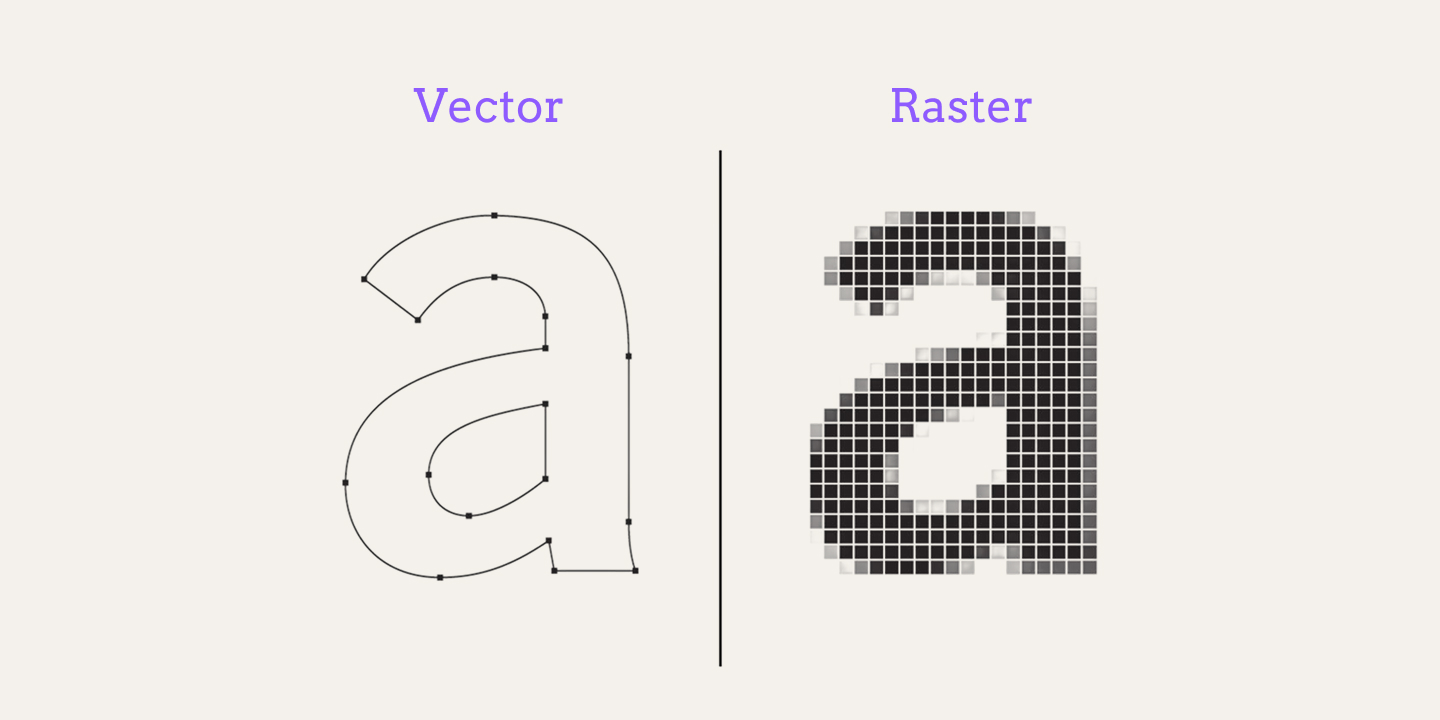
Vector files describe the artwork as math. The logo is built from points, curves and fills that the print software can recompute at any size. A vector logo prints just as sharply large on a big backprint as it does in a small corner print - there is no pixel grid to break, because there is no grid at all. Common vector formats: .ai, .eps, .svg, .pdf.
Raster files describe the artwork as a fixed grid of pixels. A photo, a screenshot, an image exported from a design tool at one size. It looks exactly as good as its resolution allows at that size - and it starts to soften the moment you need it bigger. Common raster formats: .png, .jpg, .tiff.
The rule in one line: logos should be vector; photos are raster by nature.
What a file check actually flags
The most common file we reject at intake: a small raster logo (often pulled off a website or out of an email signature) or text that is not in curves. Together these cover most of the file prep that actually happens in merch production.
Why text must be in curves (outlined): when you convert text to curves, every letter becomes geometry - it prints exactly as designed without needing the font to exist. If the text stays live, the printer needs the exact font; if that font is missing, the order prints with a substitute font and the design comes out wrong. Two equal options: send the font along with the file, or convert the text to curves.
DPI reality for raster: a raster file must have enough pixels at the final print size - around 300 DPI is the working standard. A 72-DPI image pulled from a website is a fraction of the pixels, and it is simply not enough to print. We usually ask for a better version of the art - and if the logo is simple, we can re-vector it.
When raster is the right answer anyway
Photos, natural gradients and full-color imagery are raster, and they print as-is. DPI is simply what separates an image that will print clean from one that will not: a photo at 300 DPI at its final print size prints fine; an image exported small and then stretched is stretched pixels. Print it at the size its pixel count can handle, or ask for the original - the fix lives on the sending side.
What actually happens when you send a wrong file (it is fixable)
- Raster logo, vector needed - the classic case when the logo exists only as a screenshot or a low-DPI export. We ask for a better version first; if none exists, we re-vector simple logos as part of the job - text, a shape, a badge can be rebuilt from the raster.
- Live text instead of curves - two fixes: the font gets sent to us, or the text gets converted (when the design allows). Either one is quick.
- The core point: the file you send affects print quality, not whether the order happens. Files are checked at intake - a wrong format is a fixable step, not a dead end.
How SoMerch fits in
- Files are checked before production, not discovered on delivery. The file check surfaces a blurry logo before it is printed, and we ask for the right version first - or re-vector it for you when that is the better path.
- If you ended up here because the designer asked for "the vector": this page belongs to the print-ready files family - the full format story lives in file-formats, the color space question in cmyk-vs-rgb, how much resolution you actually need in dpi-and-resolution, and where the printed area actually starts in bleed. If the ask is a photo instead, send the raster - at 300 DPI and final size.
Short version
Vector is how logos get produced - any size, crisp edges, no pixel puzzle. Raster is for photos, at 300 DPI at the size it will print. Text goes in curves or the font comes along. And if the file is wrong - say so: we re-vector it.