Bleed
Bleed is the extra area of artwork that extends past the cut line, so the colour and print reach the very edge of the item with no white line. No bleed, a printed edge that should reach the item's edge arrives with a thin unprinted border. It is a normal part of a print-ready file.
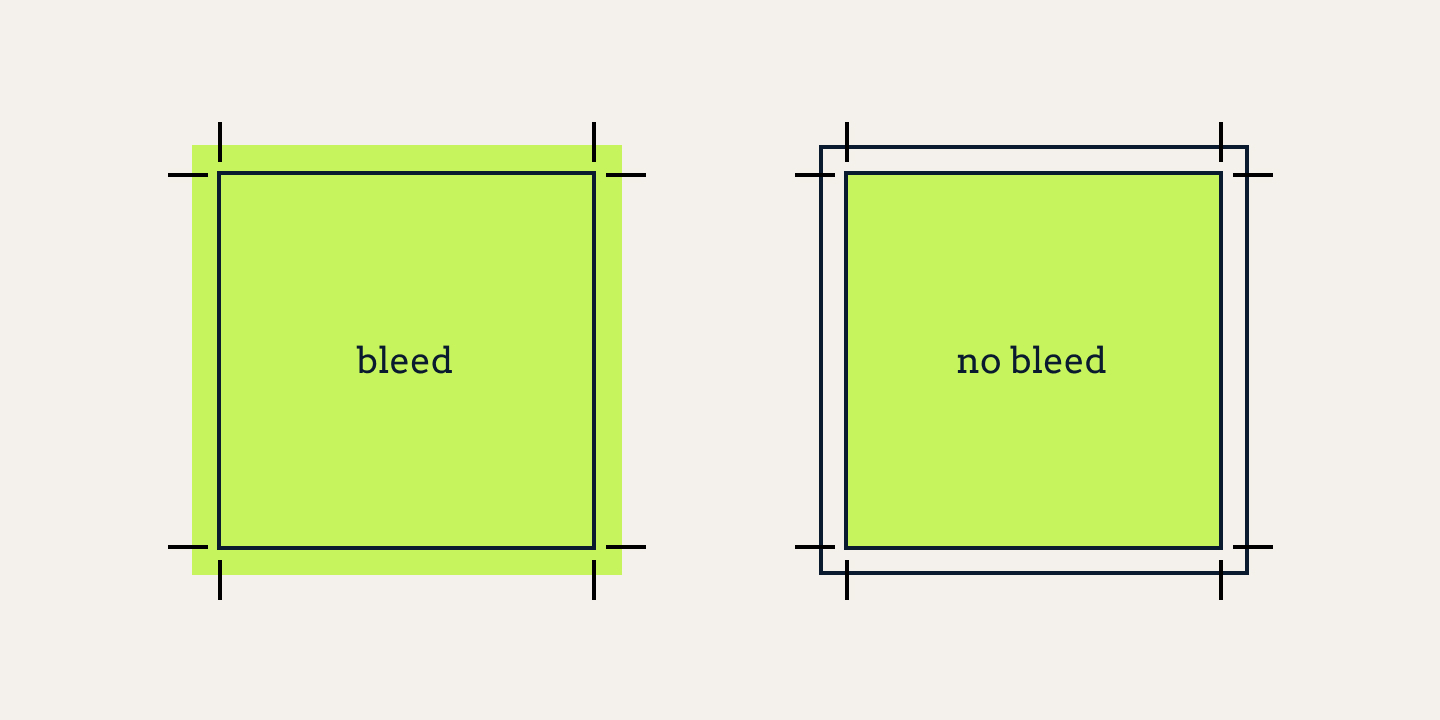
Intro
Bleed is the part of a print file nobody sees in the finished product - and the part that makes it look right. No bleed, a printed edge that should reach the very edge of the item arrives with a thin white line. This page is the plain-language answer to what bleed is, why a file needs it, and how much to add.
What bleed actually is
Bleed is the extra area of artwork that extends past the intended cut line of the finished item. It exists for one reason: so the print can reach the very edge of the item - the edge of a mug, the fold of a tote, the side of a notepad.
Think of the artwork as fully covering the surface, and then the item is cut out of the middle of it. The design reaches the edge, the cut holds the colour, there is no white gap. No bleed: the cut clips the design before the edge, the white of the item shows.
How to use
How much depends on the item and on the technique, and it's the kind of specific that belongs on a product page, not one blanket number. On a standard flat garment or a flat surface we set the bleed to the amount our print check expects, and the cut is made inside it - so the artwork extends safely past the edge.
The honest rule: bleed is sized to the production method, and we tune it per product. No single "print area" number applies to everything - the technique plus the item decide it. That's the file-prep line.
What actually happens with none
No bleed, the printed design ends exactly at the cut line - and the cut is rarely exact. The result is a thin, unpredictable white line or white hairline around part or all of the item edge, especially on anything cut to shape (stickers, patches, flat items). It's the most common reason to look at bleed, and the extra makes it go away entirely.
How SoMerch fits in
- Bleed is part of the count - a save item we check at file intake with the rest of the specs. We set it for the product, so the design runs edge to edge and the cut is inside the bleed.
The short version
Bleed is the extra background that extends beyond the cut line so the print reaches the edge with no white gap. Sized to the product and technique, it becomes a normal part of a print-ready file.