
SoMerch Integration with Zapier
The SoMerch integration for Zapier connects merch operations to the rest of your stack. Trigger workflows from orders, shipments, shipment updates, quote requests, and order-status changes, or use SoMerch inside a Zap to find products and orders, create merch plans, and submit quote requests.
The short answer
The SoMerch integration for Zapier lets you connect merch workflows to the rest of your operating system.
Instead of checking SoMerch manually and then copying details into Slack, email, a spreadsheet, or another app, you can use Zapier to move the information automatically.
That matters for teams that run repeatable processes around onboarding, employee gifting, event merch, procurement coordination, and post-order visibility.
At a practical level, the integration currently supports five trigger workflows, three search steps, and two write actions.
Triggers
-
New Order - start a Zap when a new order is created in SoMerch.
-
New Shipment - start a Zap when an order receives a shipment.
-
Shipment Updated - start a Zap when shipment details change.
-
New Quote Request - start a Zap when a new quote request is submitted.
-
Order Status Changed - start a Zap when an order status changes in SoMerch.
Searches
-
Find Products - search the SoMerch catalog by text, category, quantity, price, and other filters.
-
Find Product Details - retrieve detailed information about a specific product.
-
Find Order - look up an order and retrieve its status and target date.
Actions
-
Create Merch Plan - generate up to three merch options from a goal, quantity, and optional budget or deadline.
-
Submit Quote Request - send a quote request into the SoMerch workflow.
For RevOps and automation teams, the value is simple: SoMerch can become one step inside a broader workflow rather than a separate manual checkpoint.

Before you start
You do not need a complex architecture before you build your first Zap, but a few inputs make the setup much easier.
| What you need | Why it matters |
|---|---|
| A Zapier account | Required to build and publish the workflow |
| A SoMerch account connection | Required for live SoMerch triggers and actions |
| A clear destination app | Helps define what should happen after a trigger fires |
| Test data | Makes it easier to validate the Zap before publishing |
| One concrete workflow goal | Prevents overbuilding too early |
Before building anything, decide whether you want the workflow to be trigger-led or action-led.
-
A trigger-led workflow starts when something happens in SoMerch, such as a new order or shipment update.
-
An action-led workflow uses SoMerch later in the Zap, for example to find a product, build a merch plan, or submit a quote request.
That distinction helps you choose the right starting point.
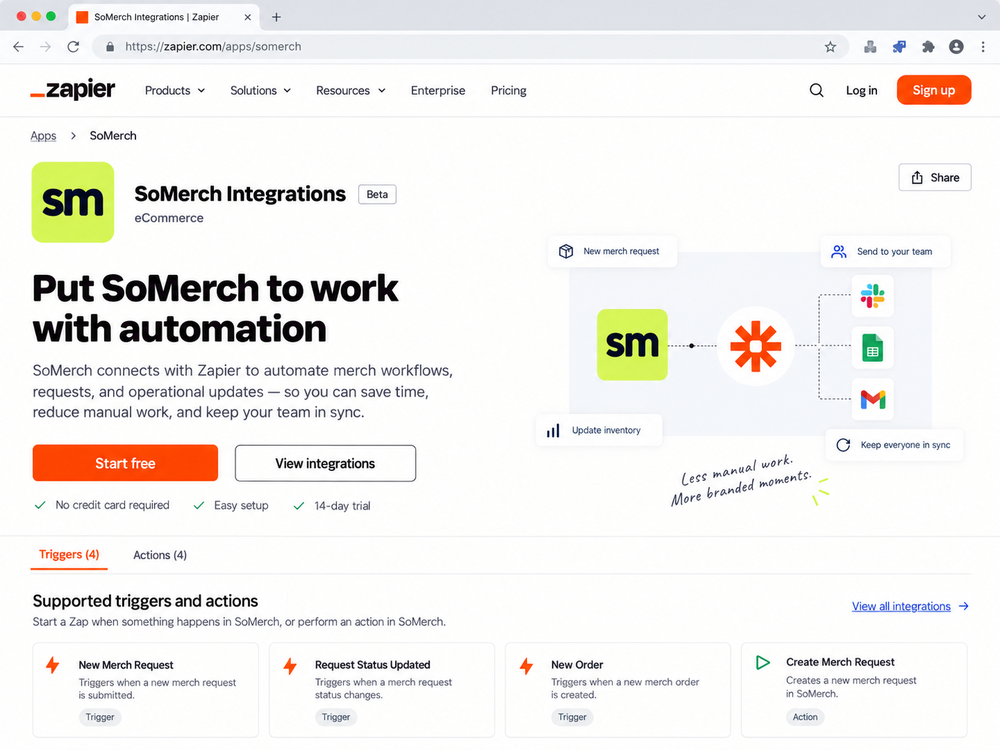
Find SoMerch in Zapier
The public listing is here:
https://zapier.com/apps/somerch/integrations
That page is the fastest way to understand what the integration is for, who it is useful for, and how to start.
From the listing, a user can open the app page, review the overview, inspect supported triggers and actions, and jump straight into Zap creation.
For a blog reader, this is also the best first destination after finishing the article.
Review supported triggers and actions
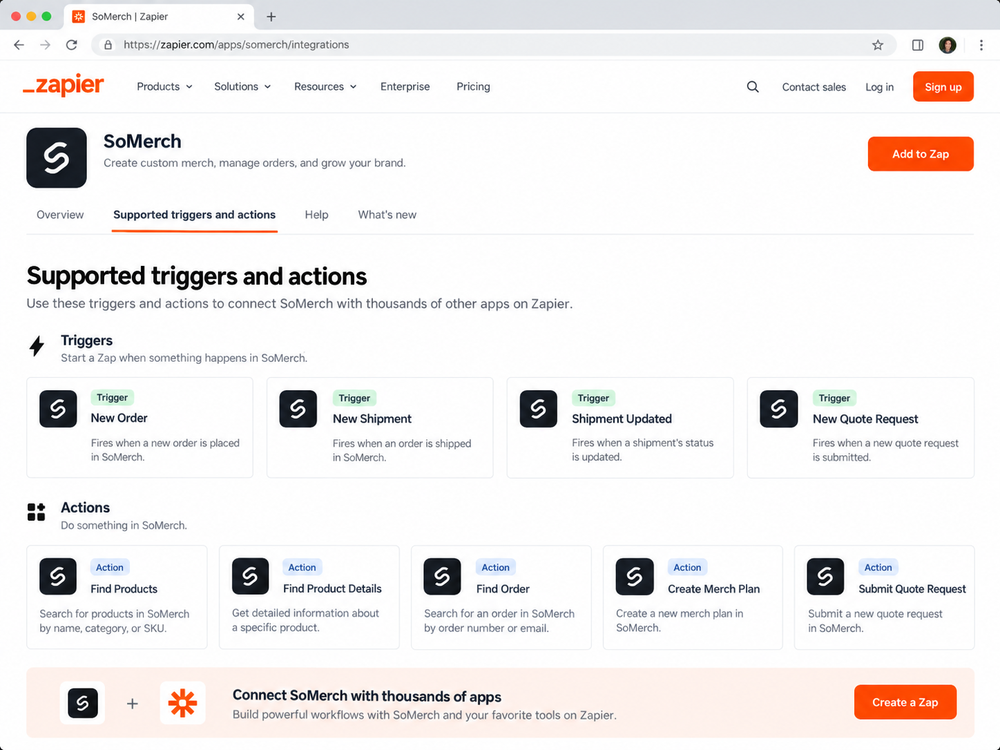
The supported triggers and actions page matters because it shows the current surface area of the integration in one place.
For automation builders, this is often the first checkpoint after the overview page because it answers two practical questions:
-
Can SoMerch start the workflow?
-
Can SoMerch also be used as a step later in the workflow?
Today the answer to both is yes.
SoMerch can act as a source of events through triggers such as New Order, New Shipment, Shipment Updated, and New Quote Request.
It can also act as an operational step deeper inside the workflow through Find Products, Find Product Details, Find Order, Create Merch Plan, and Submit Quote Request.
That mix is especially useful because it lets teams build both simple notification workflows and more structured operational flows.
Build your first Zap
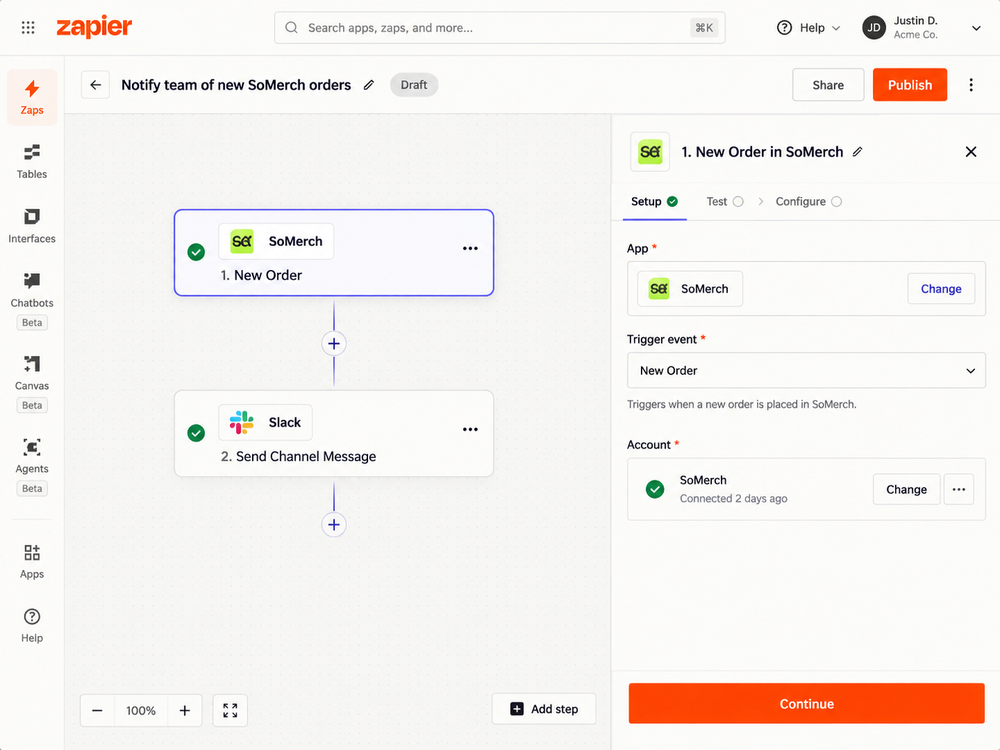
The easiest first Zap is a notification workflow.
A common example is:
SoMerch - New Order → Slack - Send Channel Message
That setup gives your internal team instant visibility whenever a new order appears in SoMerch.
A basic version usually follows this path:
-
Create a new Zap in Zapier.
-
Choose SoMerch as the trigger app.
-
Select New Order as the trigger event.
-
Connect the SoMerch account.
-
Test the trigger with sample data.
-
Choose the destination app, such as Slack.
-
Map the relevant fields into the outgoing message.
-
Publish the Zap.
This is a strong first use case because it is easy to understand, simple to verify, and immediately useful for cross-functional teams.
For example, a Slack message can include the order number, customer or company name, quantity, destination, and the next operational step.
Use SoMerch in multi-step workflows
The integration becomes more powerful when SoMerch appears in several steps of the same workflow.
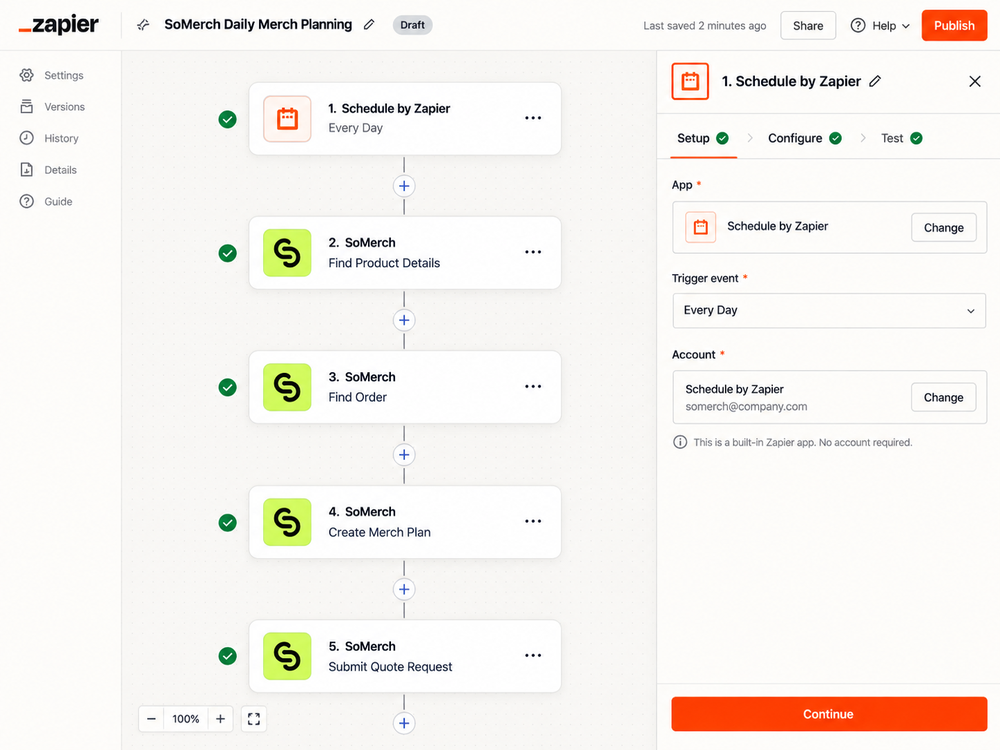
A good example is a planning flow that starts on a schedule and then uses multiple SoMerch actions:
Schedule by Zapier → Find Product Details → Find Order → Create Merch Plan → Submit Quote Request
This kind of Zap is useful when you want to automate a repeated internal routine, such as:
-
reviewing a short list of products every morning;
-
pulling order information into a reporting flow;
-
turning a brief into a structured merch plan; or
-
creating a quote request after an internal approval step.
The key point is that SoMerch is not limited to one isolated action. It can be used as part of a sequence that combines lookup, planning, and handoff.
Practical use cases for RevOps and automation teams
Below are several practical ways RevOps and automation teams can use the integration.
1. Notify the right team when a new order arrives
A New Order trigger can route details to Slack, Microsoft Teams, Gmail, or a project-management tool so the right people know immediately when work needs to happen.
2. Keep shipment visibility current
A New Shipment or Shipment Updated trigger can notify customer success, workplace, or operations teams when tracking information changes.
This is especially helpful when shipments go to multiple offices, event locations, or home addresses.
3. Route quote requests into an internal follow-up process
A New Quote Request trigger can post into a sales or ops channel, create a task, or log the request in another system so the follow-up process is visible and consistent.
4. Use product lookup inside a broader workflow
The Find Products and Find Product Details actions help teams enrich a workflow with SoMerch product information rather than switching tools manually.
For example, an internal form submission could trigger a product search, then send the shortlist into email or Slack for review.
5. Build repeatable merch-planning routines
The Create Merch Plan action helps translate a short brief into a more structured recommendation step.
That makes it useful in workflows where a team wants to standardise intake for onboarding kits, employee gifts, or event merchandise.
6. Submit quote requests as the final operational step
Once the workflow reaches the right decision point, Submit Quote Request can be used as the formal handoff into SoMerch.
For many automation teams, that is the cleanest pattern: search and plan first, then submit a request only after internal review.
Best practices
The integration is straightforward, but a few operating habits make the results better.
Start with one narrow workflow
Do not try to automate the entire merch operation in one Zap on day one. Start with one narrow, high-confidence workflow such as new-order notifications or shipment updates.
Keep human review where it matters
Automating notifications and data movement is usually low risk. Automating decision-making around budgets, quantities, or final commercial commitments often still benefits from a human review step.
Use descriptive Zap names
Names such as Notify team of new SoMerch orders or Daily merch planning review are much easier to manage later than generic names like Test Zap 3.
Preserve key identifiers
When possible, keep useful reference data such as order IDs, product IDs, quote-request IDs, and email addresses in downstream steps. That makes troubleshooting and reporting much easier.
Separate notification flows from request-submission flows
A notification Zap and a quote-submission Zap often serve different business purposes. Keeping them separate usually improves clarity and reduces accidental complexity.
Troubleshooting and support
If a Zap is not working as expected, check the following first.
The SoMerch account is not connecting
Reconnect the SoMerch account inside Zapier and make sure the correct account is selected for the step.
The trigger is not returning test data
Try generating a fresh event in SoMerch, then retest the trigger in Zapier. Sample data is much easier to work with when the event happened recently.
The wrong information is appearing downstream
Review the field mapping in the destination step. Many issues come from using the wrong dynamic field rather than from the trigger itself.
The workflow is too complex to debug easily
Temporarily simplify the Zap. Replace several downstream steps with one simple notification action, confirm the trigger works, then rebuild the rest incrementally.
If you need product, planning, or quote help rather than Zapier configuration help, SoMerch can support the merch side of the workflow.
Conclusion
The SoMerch integration for Zapier is useful because it brings merch operations into the same automation layer as the rest of your stack.
For RevOps and automation teams, that means less manual routing, better visibility, faster internal handoffs, and more consistent merch processes.
You can start with something simple, like new-order notifications, and then grow into more advanced workflows that use product search, order lookup, merch planning, and quote requests together.
If your team wants to make merch easier to manage across requests, orders, and follow-up, Zapier gives SoMerch a practical place inside the workflow.
CTA
Plan merch with SoMerch
-
Explore the public Zapier listing: https://zapier.com/apps/somerch/integrations
-
Learn more about SoMerch: https://somerch.co
-
Start the conversation for your next merch project with SoMerch.